

Your first steps
There are four first steps with a new Karani account. The first one takes two minutes and makes everything downstream correct, so don’t skip it.
1. Set two key settings
Section titled “1. Set two key settings”Click Settings in the left rail, or go straight to karani.co/account/settings.
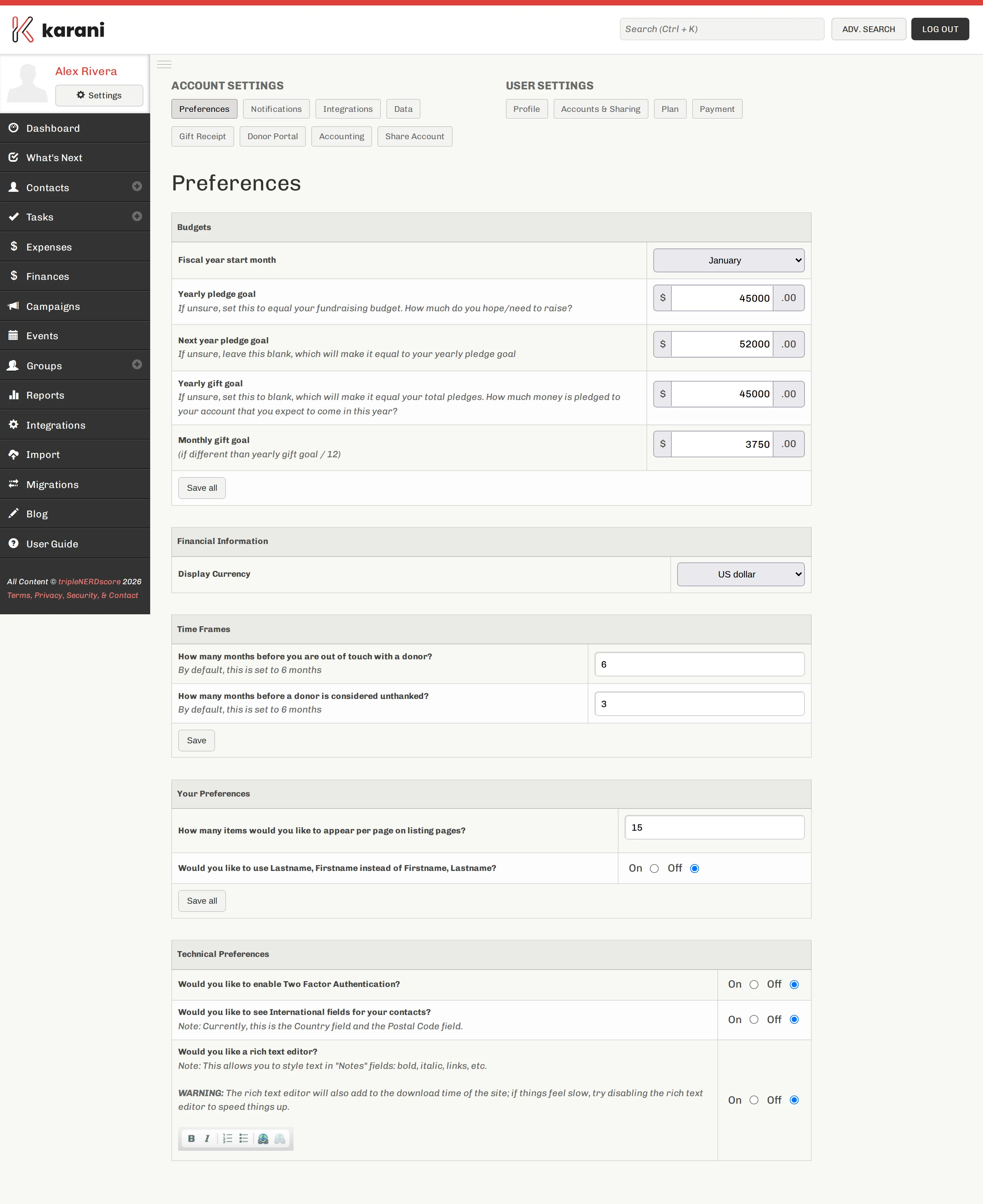
Fiscal year start month
Section titled “Fiscal year start month”Set this to the month your organisation resets its financial information. It’s almost always January or July. If you genuinely don’t know, leave it at January and ask someone later.
This matters more than it looks. Karani uses the fiscal year to decide which gifts count toward “this year,” which donors are behind, and what every progress bar on the dashboard means.
Yearly pledge goal
Section titled “Yearly pledge goal”Your pledge goal is how much money you intend to have pledged to you this year. For most people that’s identical to their annual fundraising budget.
You can also set Next year pledge goal, which makes Karani’s forward-looking calculations useful as you start planning ahead.
Click Save all.
2. Get your data in
Section titled “2. Get your data in”Now bring in what you already have.
The fastest route is the CSV importers. If your existing records live in a spreadsheet, an old CRM export, or your organisation’s donor system, you can usually get them into Karani in one pass:
If you’re coming from a supported CRM, check Migrating from another CRM first — it may do the work for you.
However you do it, get three things in: your contacts, your pledges, and your giving history. Without giving history, the reports that find lapsed and behind-on-giving donors have nothing to compare against.
3. Organise your data
Section titled “3. Organise your data”Create a few groups or tags so you can act on subsets of your list later. The two almost everyone ends up with are Email newsletter and Paper newsletter.
Don’t overthink this. Groups are cheap to create and easy to change; you’ll discover the ones you actually need by trying to do something and finding you can’t.
4. Figure out what’s next
Section titled “4. Figure out what’s next”Where you go from here depends on where you are.
If you’re just starting to fundraise, go to the Tasks page and set yourself a handful of tasks for your next steps with your prospects. Karani is at its most useful when it’s telling you who to call today.
If you’ve been fundraising a while, two places will tell you something you didn’t know:
- Reports — particularly Donors Behind on Giving, Lapsed Donors, and Out of Touch Donors.
- Finances — the honest picture of where you stand against your goal.
Any time you’re not sure what to do, open What’s Next. That page exists specifically for the “I have twenty minutes and no plan” problem.
From here, browse whichever section of these docs matches what you’re trying to do — or press Ctrl K and search for it.