

Contacts overview
A contact is a person or an organisation you’re in relationship with. Everything else in Karani — gifts, pledges, tasks, interactions, tags, group memberships — hangs off a contact.
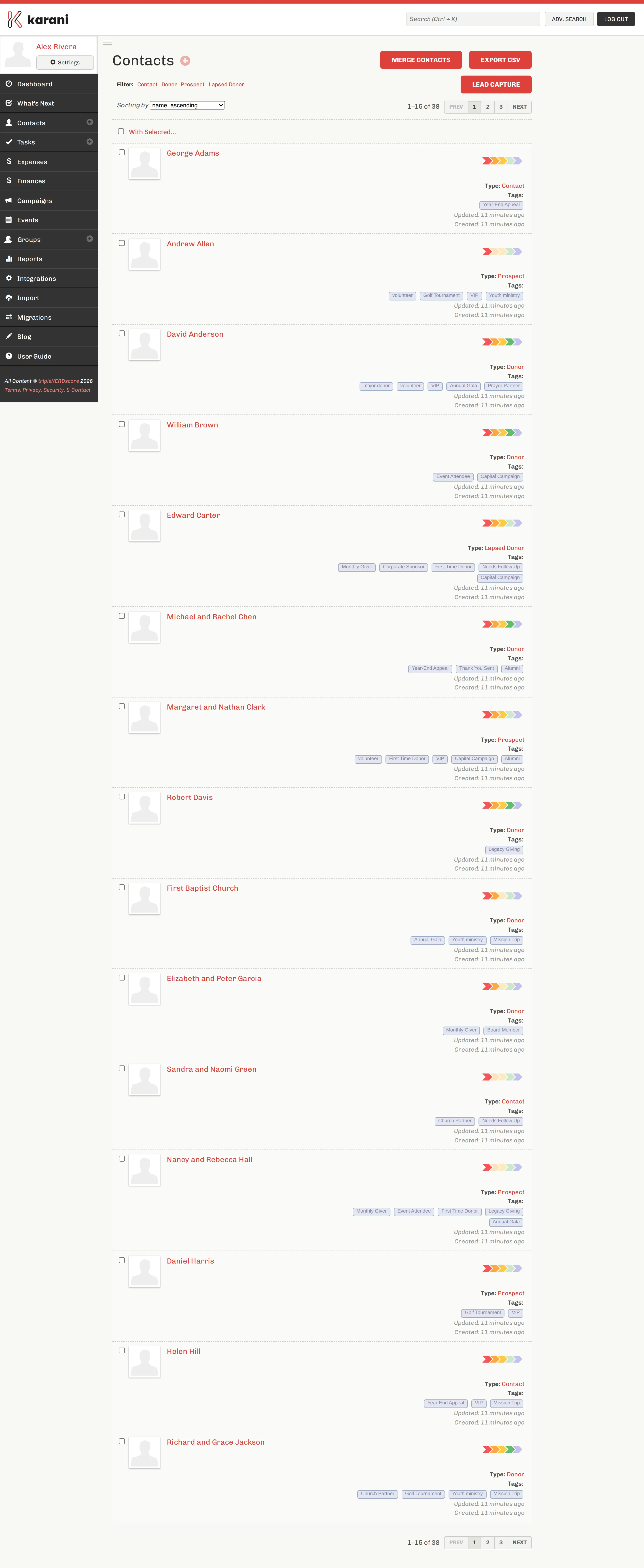
The list
Section titled “The list”Each row shows the contact’s name, their type (status), their tags, and when they were last updated. Click any name to open their profile.
Filters
Section titled “Filters”The Filter row at the top narrows the list by status: Contact, Donor, Prospect, or Lapsed Donor. Click one to filter; click it again to clear.
Archived contacts are hidden from this list by default — see Archiving & deleting.
Sorting
Section titled “Sorting”The Sorting by dropdown reorders the list. Name ascending is the default, but sorting by last updated is often more useful — it surfaces who you’ve touched recently.
How many per page
Section titled “How many per page”Set this under Settings → Preferences with How many items. It applies to every listing page in Karani, not just contacts.
The chevrons
Section titled “The chevrons”The row of coloured arrows on the right of each contact is their 3D rating — Karani’s at-a-glance summary of how the relationship is going. More filled-in chevrons means a stronger, more current relationship, based on how recently you’ve interacted, whether they’re giving, and whether they’re on track with their pledge.
It’s a prompt, not a score to optimise. A donor with two chevrons is someone worth a phone call.
Bulk actions
Section titled “Bulk actions”Tick the checkbox next to one or more contacts and the With Selected… dropdown becomes active. From there you can add the selected contacts to a group, add tags, or change their status in one pass.
Tick the checkbox in the header row to select every contact on the current page.
The buttons above the list
Section titled “The buttons above the list”- Merge contacts — find and combine duplicates. See Merging duplicates.
- Export CSV — download the current list. See Exporting your data.
- Lead capture — get an embeddable form that adds people to this list automatically. See Lead capture forms.