

Lead capture forms
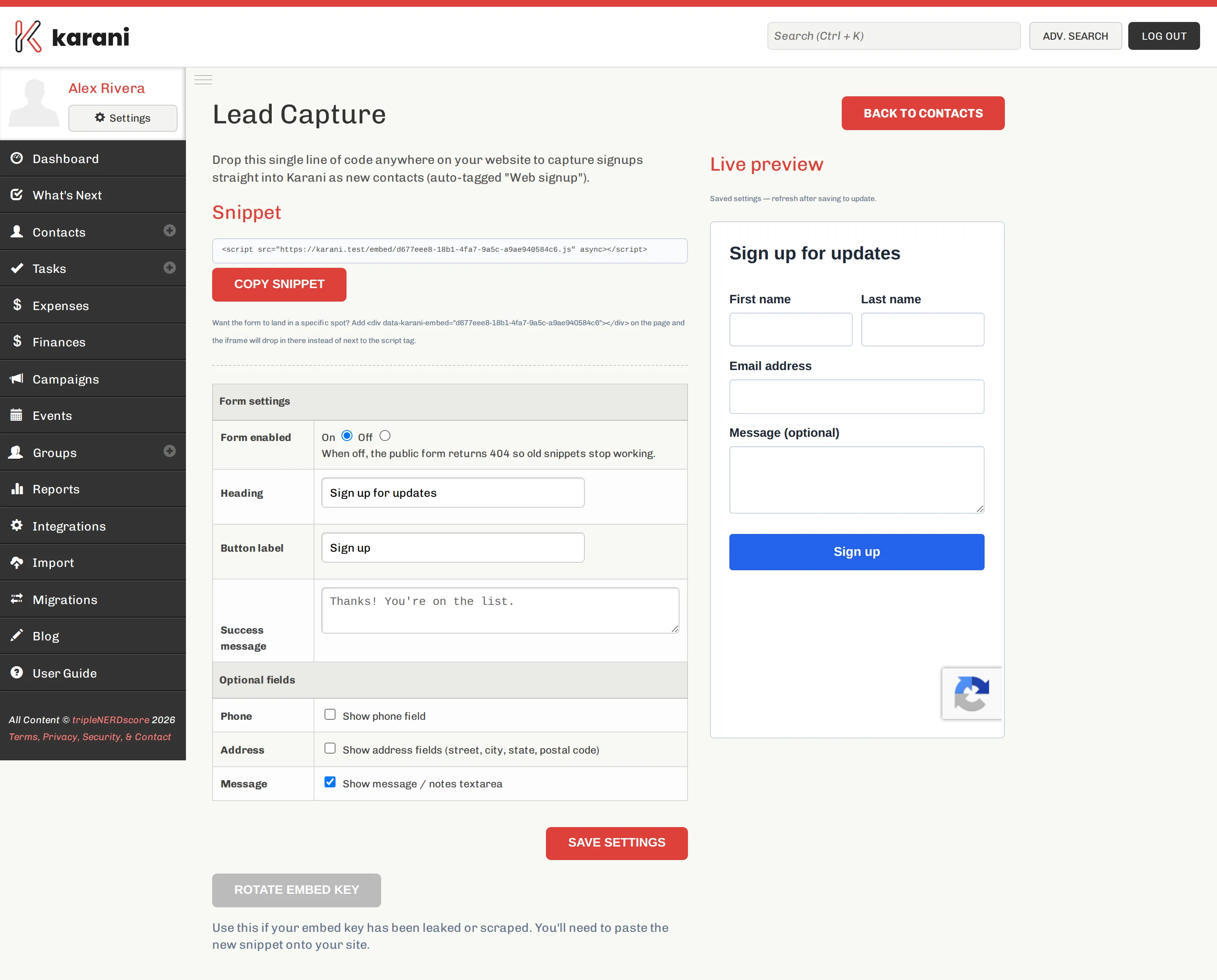
Lead capture is an embeddable sign-up form. Drop one line of code on your site and submissions arrive as Karani contacts, automatically tagged Web signup.
Configure it at karani.co/contacts/lead-capture, or via Lead Capture on the contacts list.
Embedding it
Section titled “Embedding it”Copy the snippet and paste it into your page:
<script src="https://karani.co/embed/YOUR-KEY.js" async></script>The form appears where the script tag sits.
Placing it somewhere specific
Section titled “Placing it somewhere specific”To control where it lands, add a target element anywhere on the page:
<div data-karani-embed="YOUR-KEY"></div>The iframe drops into that element instead of next to the script tag. Useful when your script tags live in the page footer.
Settings
Section titled “Settings”| Setting | Notes |
|---|---|
| Form enabled | When off, the public form returns 404 so old snippets stop working. |
| Heading | The form’s title. Default: “Sign up for updates”. |
| Button label | Default: “Sign up”. |
| Success message | Shown after submission. Default: “Thanks! You’re on the list.” |
Optional fields
Section titled “Optional fields”Name and email are always shown. You can additionally enable:
- Phone
- Address — street, city, state, postal code
- Message — a notes textarea
The live preview on the right shows the current form. Save, then refresh to see changes.
What happens on submission
Section titled “What happens on submission”A new contact is created, tagged Web signup. The message, if you enabled it, lands in the contact’s notes.
A useful habit: a saved search for contacts tagged “Web signup” added in the last 30 days, checked weekly.
Rotating the key
Section titled “Rotating the key”Rotate embed key issues a new key.
The form includes bot protection. If spam signups get through anyway, turning Form enabled off stops submissions immediately while you sort it out.
Where to use it
Section titled “Where to use it”- Your personal support page
- A newsletter sign-up in your site footer
- A landing page for a specific appeal
- A QR code at an event, pointing at a page with the form
Alternatives
Section titled “Alternatives”- Taking money rather than details — online giving
- Event sign-ups — fundraising events have their own public registration page
- A form builder you already use — connect it via Zapier or the API